The Screenshot That Pretends to Be the Whole Story
Learn how to trace a news screenshot to its original image and fuller context, so you can see what the crop leaves out before sharing it.
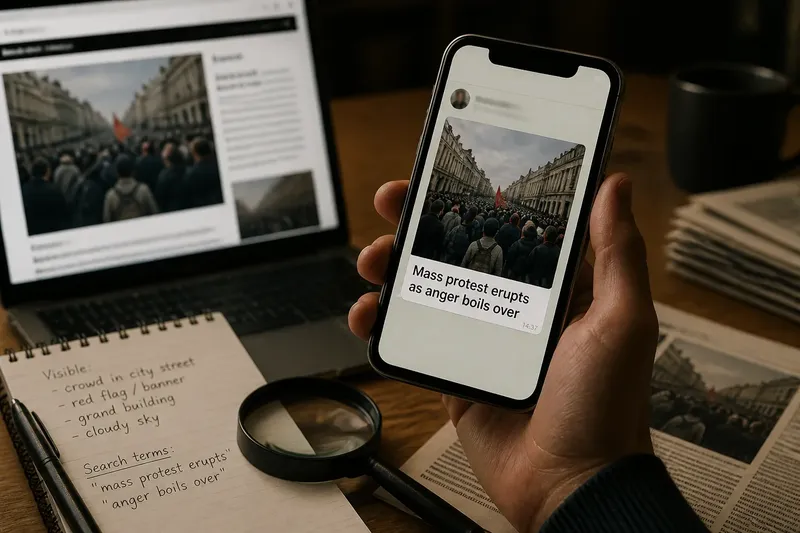
A screenshot arrives in a family chat: a photograph, a bold caption and a claim that seems to settle an argument. You can read every word, yet still not know who made the image, where it first appeared or what sat just beyond its edges. Tracing a news screenshot back to its original source helps recover those missing pieces.
A screenshot feels self-contained because it holds visible evidence in one neat frame. But it is a record of a view, not necessarily a record of the complete item. The image may have been cropped, paired with new text, taken from a video or detached from a page whose date and explanation matter.
A screenshot preserves a view, not its full setting
Think of a screenshot as a small window cut from a larger scene. It might show a photograph and a sentence from a news site, while hiding the article title, publication name, date, surrounding paragraphs and links. It can also show a post with the account name cropped away.
Those omissions are not always deliberate. Someone may have captured only the part that fitted a phone screen, or shared an image after a messaging app removed the original link. But the result can still alter what a reader understands. A quote without the question that prompted it, for example, can sound more sweeping than it did in the full exchange.
The image itself has context too. A photograph can be genuine yet used to illustrate a different place, occasion or claim. A frame from a video may show a brief moment that looks decisive, while the movement before or after it changes how the scene reads.
Separate what is visible from what is being claimed
Before searching, describe what the screenshot actually contains. Is there a photograph, a headline, a social media post, a chart, a message, or several of these? Note visible names, logos, dates, captions and unusual phrases, without treating them as verified facts.
Then separate that visible material from the claim attached to it. A screenshot might visibly show a crowd in a street; a caption may assert that the crowd gathered for a particular reason. The first is an observation about the picture. The second needs its own support.
This distinction keeps the search focused. If the image is the central evidence, look for the image’s earlier appearances. If the claim depends on a sentence, search that wording and identify where it was published. If both matter, trace them separately before deciding whether they belong together.
- Write down any exact phrase that appears legible.
- Record visible publication, account or photographer names as clues, not confirmation.
- Notice whether the screenshot includes a date, location or link.
- Describe what the image shows without repeating the accompanying claim as fact.
A few careful observations can be more useful than a quick reaction to the caption.
Find the fuller item through its visible clues
Start with the easiest clue: text. Search an exact, distinctive phrase in quotation marks, or enter a few unusual words without them. If the screenshot appears to come from a news article, try the visible headline together with the outlet’s name. Search results may point to the full page, a later version, or another outlet quoting the same material.
For a photograph, use a reverse-image search tool such as Google Lens or TinEye where available. Upload the image or provide its image address if the service allows it. If the screenshot includes borders, captions or other graphics, crop a copy to focus on the picture itself; searching a clean image may make it easier to locate matching versions.
Try more than one crop when needed. A tight crop can remove distracting text, while a wider crop may retain a distinctive landmark or object. A match is a lead, not a conclusion: the search tool may return copies, unrelated lookalikes or pages that have reused the image without identifying its source.
If you find a likely match, open the page rather than relying on the search-result preview. Check the page title, publication, author or credited image source, date, caption and any explanation near the image. A preview can preserve an old headline or show a fragment that the current page no longer uses.
Follow the image beyond its first apparent match
The earliest result you can find is not automatically the original. Search indexes are incomplete, pages can disappear, and an image may have circulated privately before appearing on a public site. It is safer to say “the earliest source I could locate” than to claim certainty about where an image began.
Look for signs that two copies are the same underlying photograph: matching people, objects, background details and distinctive shadows. A repost may resize or compress an image, add text, change colour or trim its edges. Those changes do not necessarily make it a different photograph, but they can conceal useful clues.
Captions deserve their own check. One page may identify a place or event; another may repeat the picture while giving it a different setting. Compare the wording and look for a photographer credit, agency name, original post or link. When a page provides no attribution, that absence is a reason to keep searching, not proof that the picture is false.
Now inspect the full item’s surroundings. An article may explain that a photograph is illustrative, archival or supplied by an organisation. A post may link to a longer statement. A video page may include a fuller clip. These details can clarify what the image was intended to show without resolving every question about the event.
A changed caption can change the meaning
Images carry visual information, but captions tell readers how to interpret it. A scene of people standing near a building might be labelled as a demonstration, a queue or a gathering after an incident. The picture alone may not establish which description is right.
When a screenshot’s caption differs from the fuller item, ask what the original wording supports. Does it identify the pictured people or merely describe the location? Does it say when the photograph was taken, or only when the page was published? Is the caption attributed to a photographer or written by the account sharing it?
Also watch for text that has been laid over the image. A quote card can preserve the appearance of a statement while omitting its source, date or surrounding exchange. Search a distinctive phrase, then look for the original recording, transcript, statement or report rather than treating a graphic as a citation.
Say you receive a cropped photograph with the caption, “Residents flee after the factory alarm.” Imagine you search the visible wording and find a local report containing the same photograph, but its caption identifies the scene as a scheduled evacuation exercise. The useful result is not merely finding a matching picture; it is seeing that the screenshot’s new caption makes a different claim from the fuller item. You would still need separate evidence to establish what happened at the factory.
How can you tell whether the screenshot is complete?
Does the screenshot show where the image came from?
Look for a publication name, account handle, photographer credit, link or caption. A recognisable logo can be copied, and a visible name can be edited, so treat these as search clues until you reach the source page or original post.
Can a reverse-image search identify the source?
It can surface visually similar copies and pages that use the same photograph. Results do not establish which page published it first or whether the caption is accurate, so open promising matches and compare their credits, dates and surrounding text.
What if no matching image appears?
Try a cleaner crop, a distinctive phrase from the screenshot, or another search service. No match does not show that an image is authentic or fabricated; it may be new, altered, poorly indexed or available only in a private space.
Is a genuine image enough to support the caption?
No: the photograph can be authentic while the attached date, location or explanation is mistaken. Check those details in the fuller item and seek separate support for any claim the picture cannot establish on its own.
Keep uncertainty visible when you share
After tracing the image, describe what you actually found. “This appears in an article from the local paper, with a caption identifying it as an exercise” is more precise than “This proves the post is fake.” If the source remains unclear, say that the origin is unconfirmed rather than filling the gap with a guess.
When sharing the result, send the fuller page or original post where possible, not another cropped image of it. Add a short note explaining what changed between the screenshot and the source: the date, caption, attribution or surrounding text. That gives the next reader a route to check your reasoning.
If the source page has been updated, note the visible publication or update information and avoid implying that an old screenshot shows the current version. Save the relevant link and, when appropriate, the page title or caption that led you there. A link makes the trail easier to follow than a claim that you “found the original”.
Tracing a news screenshot is less about catching someone out than restoring the missing frame around an image. The useful habit is simple: identify what is visible, follow its clues to a fuller item, and keep the caption’s claim separate from what the picture can show. When you share a news screenshot, include the source and the context you could verify, while leaving unresolved details clearly unresolved.